5 Powerful n8n Automation Workflows to Skyrocket Your Sales in 2025
Meta Description: Discover 5 game-changing n8n automation workflow for sales that save time, boost conversions, and streamline your sales process in 2025.
Sales teams are drowning in repetitive tasks. Between manually entering leads into CRMs, sending follow-up emails, and tracking pipeline metrics, your sales reps spend less than 35% of their time actually selling, according to Salesforce’s State of Sales Report. That’s a staggering waste of talent and potential revenue.
Enter n8n automation workflow for sales—a revolutionary approach that transforms how modern sales teams operate. By automating routine processes, your team can focus on what truly matters: building relationships and closing deals. In this comprehensive guide, you’ll discover five powerful n8n workflows that can save your team 15+ hours per week while increasing lead conversion rates by up to 40%.
We’ll walk through each workflow step-by-step, showing you exactly how to implement them, which tools to integrate, and the tangible ROI you can expect. Whether you’re a sales leader looking to scale operations or a solo entrepreneur wanting to work smarter, these automation strategies will revolutionise your sales process.
What is n8n and Why It Matters for Sales Teams
n8n is an open-source workflow automation platform that connects your favourite sales tools without requiring extensive coding knowledge. Unlike traditional automation platforms that charge per workflow or integration, n8n offers unlimited possibilities at a fraction of the cost.
For sales teams, this means connecting your CRM, email platform, lead generation tools, and communication channels into seamless automated workflows. The platform uses a visual interface where you drag and drop nodes to create sophisticated automation sequences that would typically require a developer.
What sets n8n apart is its flexibility. You can self-host it for complete data control or use their cloud version for convenience. With over 350 integrations and the ability to create custom connections via API, n8n adapts to your existing tech stack rather than forcing you to change tools.
The ROI of Sales Automation in 2025
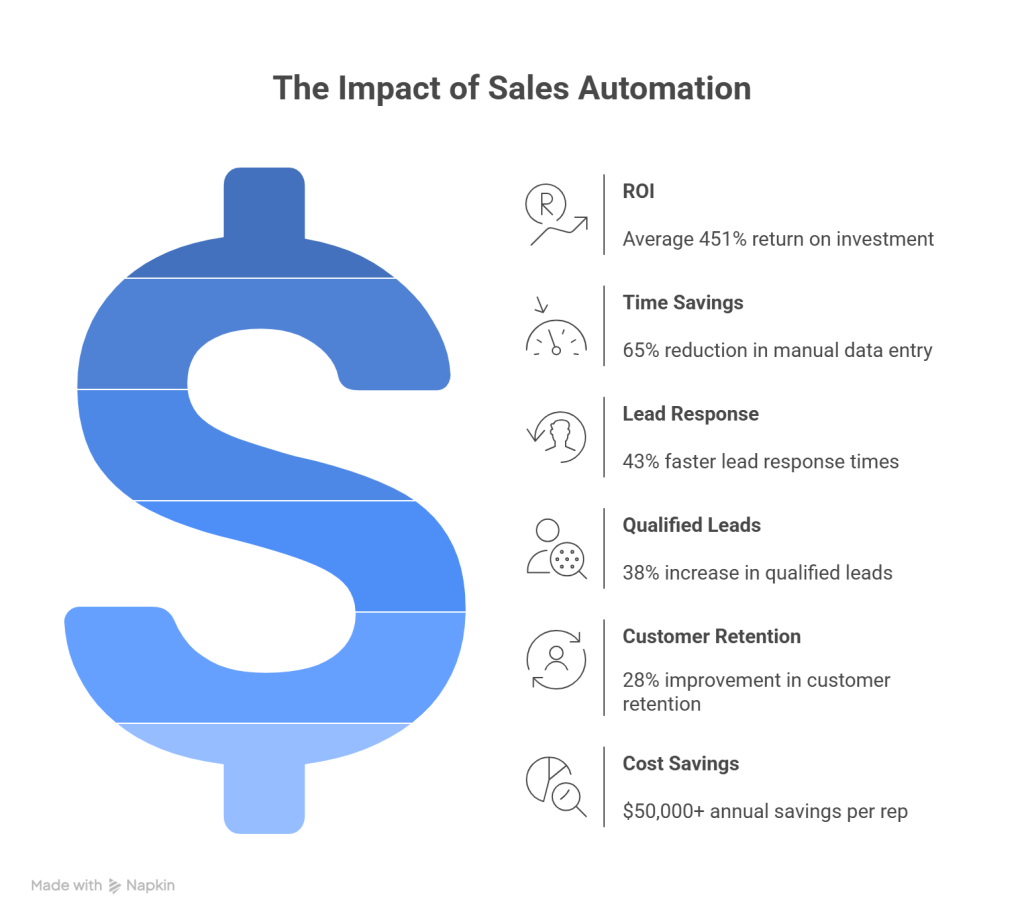
Recent studies show that sales automation delivers an average ROI of 451% within the first year, according to Nucleus Research. Companies implementing n8n automation workflow for sales report:
- 65% reduction in manual data entry time
- 43% faster lead response times
- 38% increase in qualified leads reaching sales reps
- 28% improvement in customer retention rates
- $50,000+ annual savings per sales rep on average
The competitive advantage is clear: while your competitors manually process leads, your automated workflows capture, qualify, and nurture prospects 24/7.
What You’ll Learn from These 5 Workflows
This guide provides actionable blueprints for implementing five essential sales workflows. Each section includes detailed setup instructions, required integrations, expected time savings, and common mistakes to avoid. By the end, you’ll have a complete roadmap for transforming your sales operations through intelligent automation.
Understanding n8n for Sales Automation
Before diving into specific workflows, it’s crucial to understand what makes n8n the ideal choice for sales automation and which processes benefit most from automation.
What Makes n8n Different from Other Automation Tools
Unlike Zapier or Make.com, n8n offers several unique advantages for sales teams. First, it’s open-source, meaning no vendor lock-in and complete transparency in how your data flows. Second, the self-hosted option ensures sensitive customer data never leaves your infrastructure—critical for enterprises with strict compliance requirements.
The platform’s node-based interface provides granular control over every step in your workflow. You can add conditional logic, transform data, handle errors gracefully, and create loops—capabilities that basic automation tools struggle with. For sales teams dealing with complex qualification criteria or multi-step nurture sequences, this flexibility is invaluable.
Cost-effectiveness is another differentiator. While competitors charge based on tasks or workflows, n8n’s self-hosted version is completely free, and their cloud offering provides unlimited workflows at predictable pricing. For growing sales teams, this scalability without escalating costs is a game-changer.
Key n8n Features That Benefit Sales Teams
Several n8n features specifically address sales team needs:
- Webhook triggers: Instantly capture leads from forms, chatbots, or landing pages
- Schedule triggers: Run daily reports, weekly pipeline reviews, or monthly forecasts automatically
- Conditional routing: Send high-value leads to senior reps whilst distributing others round-robin
- Data transformation: Clean, enrich, and standardise lead data before it enters your CRM
- Error handling: Receive notifications when workflows fail, preventing lost leads
- Execution history: Audit every workflow run to troubleshoot issues and optimise performance
Common Sales Processes That Can Be Automated
Nearly every repetitive sales task can benefit from automation. The highest-impact processes include lead capture and distribution, lead scoring and qualification, follow-up email sequences, CRM data synchronisation, pipeline notifications, meeting scheduling, proposal generation, contract management, customer onboarding, and renewal reminders.
The key is identifying bottlenecks in your current process. Where do leads get stuck? Which tasks consume the most time? Where do human errors occur most frequently? These pain points are your best automation opportunities.
Workflow 1: Automated Lead Capture and Distribution
The first critical workflow ensures no lead falls through the cracks. This n8n automation workflow for sales captures leads from multiple sources and instantly distributes them to the right sales rep based on territory, product interest, or deal size.
How This Workflow Works
When a prospect fills out a form on your website, attends a webinar, or downloads a resource, the workflow triggers immediately. It captures all form data, enriches it with additional information from databases like Clearbit or Hunter.io, applies your qualification criteria, and assigns the lead to the appropriate sales rep based on predefined rules.
The assigned rep receives an instant notification via Slack, email, or SMS with all relevant lead details. Simultaneously, the lead is added to your CRM with proper tagging and categorisation. If it’s a high-priority lead, the workflow can even schedule an automatic follow-up task or trigger a personalised email sequence.
Tools and Integrations Needed
This workflow typically connects your form builder (Typeform, Google Forms, or Webflow), enrichment service (Clearbit, Hunter.io), CRM (HubSpot, Salesforce, Pipedrive), notification platform (Slack, Microsoft Teams), and email service (Gmail, Outlook, SendGrid).
The beauty of n8n is that you can mix and match based on your existing stack. The platform’s extensive integration library means you’re not forced to switch tools to achieve automation.
Step-by-Step Setup Guide
Start by creating a new workflow in n8n. Add a Webhook node as your trigger—this generates a unique URL that your form will send data to. Configure your form to POST submissions to this webhook URL.
Next, add an enrichment node. Connect to Clearbit or your preferred service to append company size, industry, and revenue data. This enrichment helps with lead scoring and routing decisions.
Add a Function node to implement your distribution logic. This might be round-robin assignment, territory-based routing, or weighted distribution based on rep capacity. The function evaluates lead attributes and returns the assigned rep’s details.
Connect your CRM node to create the lead record. Map form fields to CRM fields, ensuring data consistency. Include the assigned rep as the lead owner.
Finally, add notification nodes. A Slack node can post to a channel or DM the assigned rep. An email node can send a formatted notification with lead details. For urgent leads, add an SMS node using Twilio.
Test thoroughly by submitting test leads and verifying each step executes correctly. Check that data appears properly in your CRM and notifications arrive as expected.
Expected Time Savings and Benefits
This workflow eliminates 2-3 hours of daily manual lead processing for a typical sales team. More importantly, it reduces lead response time from hours to seconds—a critical factor since leads contacted within 5 minutes are 21 times more likely to convert than those contacted after 30 minutes, according to research published in Harvard Business Review.
Additional benefits include zero data entry errors, consistent lead qualification, fair distribution preventing rep disputes, and complete audit trails showing exactly when and how each lead was processed.
Common Pitfalls to Avoid
The most common mistake is insufficient error handling. Always add error workflow branches to catch failed API calls or invalid data. Without this, a single error can break your entire lead capture process.
Another pitfall is over-complicating distribution logic. Start simple with round-robin or basic territory rules. You can always add sophistication later once the basic workflow proves reliable.
Finally, don’t forget to set up monitoring. Configure n8n to alert you when workflows fail or when execution times exceed normal thresholds. Proactive monitoring prevents extended outages that cost you leads.
Workflow 2: Intelligent Lead Scoring and Qualification
Not all leads are created equal. This workflow automatically scores and qualifies leads based on demographic data, behavioural signals, and engagement patterns, ensuring your sales team focuses on the highest-potential opportunities.
How This Workflow Works
This n8n automation workflow for sales monitors lead activities across multiple touchpoints. When a lead takes an action—visiting pricing pages, opening emails, attending webinars, or requesting demos—the workflow calculates a score based on your predefined criteria.
The system assigns points for positive signals (job title match, company size, budget indicators) and deducts points for negative signals (personal email addresses, student domains, competitors). Once a lead crosses your threshold score, it’s automatically marked as sales-qualified and routed to your sales team with priority flagging.
Tools and Integrations Needed
You’ll need your CRM (HubSpot, Salesforce, Pipedrive), marketing automation platform (Marketo, ActiveCampaign), website analytics (Google Analytics, Mixpanel), and enrichment services (Clearbit, ZoomInfo). Some teams also integrate with intent data providers like Bombora for advanced scoring.
Step-by-Step Setup Guide
Begin by defining your ideal customer profile and scoring criteria. Create a spreadsheet listing attributes and their point values. For example: C-level title (+20 points), company size 100-500 employees (+15 points), visited pricing page (+10 points), opened 3+ emails (+5 points).
In n8n, create a workflow triggered by CRM updates or scheduled to run hourly. Add a CRM node to fetch leads updated since the last run. For each lead, query your various data sources to gather scoring inputs.
Use a Function node to implement your scoring algorithm. This node receives all lead data and calculates the total score based on your criteria. The function should be well-documented so you can easily adjust scoring rules as your ideal customer profile evolves.
Add conditional branches based on score thresholds. High-scoring leads (80+ points) might trigger immediate sales notifications and priority tagging. Medium-scoring leads (50-79 points) enter nurture sequences. Low-scoring leads (below 50) remain in marketing automation for further warming.
Update your CRM with the calculated score and qualification status. Add a note documenting which factors contributed to the score for sales rep context.
Expected Time Savings and Benefits
Automated lead scoring eliminates 10-15 hours weekly that sales managers spend manually reviewing and prioritising leads. More significantly, it increases conversion rates by 20-30% by ensuring reps contact the most qualified prospects first.
The workflow also provides consistency—every lead is evaluated using the same criteria, eliminating subjective bias. Over time, you can analyse which scoring factors best predict closed deals and refine your algorithm accordingly.
Common Pitfalls to Avoid
The biggest mistake is creating overly complex scoring models initially. Start with 5-7 key criteria that strongly correlate with closed deals. You can always add nuance later.
Another common error is setting thresholds too high or too low. Monitor your score distribution and adjust thresholds so approximately 20-30% of leads qualify as sales-ready. If everyone qualifies, your criteria aren’t selective enough. If no one qualifies, you’re being too restrictive.
Don’t forget to implement score decay. A lead who was highly engaged six months ago but hasn’t interacted since shouldn’t maintain a high score. Reduce scores over time for inactive leads to keep your pipeline fresh.
Workflow 3: Automated Follow-Up Email Sequences
Consistent follow-up is the difference between average and exceptional sales performance. This workflow ensures every prospect receives timely, personalised communication without manual effort from your sales team.
How This Workflow Works
When a lead enters a specific stage in your pipeline—whether that’s initial contact, demo completed, proposal sent, or negotiation—this n8n automation workflow for sales triggers a customised email sequence. Each email is timed strategically, with content tailored to the lead’s stage, industry, and previous interactions.
The workflow monitors for responses and engagement. If a prospect replies or clicks a link, the sequence pauses and notifies the assigned rep to take over personally. If there’s no engagement after a set number of emails, the lead is either moved to a long-term nurture sequence or marked for manual review.
Tools and Integrations Needed
You’ll need your CRM, email service provider (Gmail, Outlook, SendGrid), email tracking tool (Mailtrack, Yesware), and optionally a template management system. Some teams also integrate with AI writing tools to generate personalised email variations at scale.
Step-by-Step Setup Guide
Start by mapping your sales process stages and defining appropriate email sequences for each. For example, after a demo, you might send: Day 0 – Thank you and recap, Day 2 – Case study relevant to their industry, Day 5 – ROI calculator or comparison guide, Day 8 – Limited-time offer or next steps.
Create email templates for each message in your sequences. Use merge tags for personalisation—prospect name, company, specific pain points discussed, etc. Write templates in a conversational tone that sounds like they’re coming from the assigned rep, not marketing automation.
In n8n, create a workflow triggered by CRM stage changes. When a lead moves to “Demo Completed,” for instance, the workflow initiates. Add a Wait node to create delays between emails—this is crucial for natural pacing.
For each email in the sequence, add an Email node configured with your template. Use the Set node to dynamically populate merge tags with lead-specific data from your CRM.
After each email, add a Webhook node that listens for replies or link clicks. If engagement is detected, use an IF node to branch the workflow—stopping the sequence and creating a task for the sales rep to follow up personally.
Include a final branch for leads who complete the entire sequence without engaging. These might be moved to a different pipeline stage, assigned to a different rep, or entered into a longer-term nurture campaign.
Expected Time Savings and Benefits
This workflow saves each sales rep 5-8 hours weekly on follow-up emails. More importantly, it ensures zero prospects slip through the cracks due to forgotten follow-ups—a problem that costs the average company 15-20% of potential revenue.
Automated sequences also enable A/B testing at scale. You can test different subject lines, email copy, or timing to optimise response rates systematically rather than relying on individual rep preferences.
Common Pitfalls to Avoid
The most critical mistake is making automated emails sound robotic. Every message should read as if the sales rep personally wrote it. Use conversational language, reference specific details from previous interactions, and avoid marketing jargon.
Another pitfall is continuing to email prospects who’ve gone dark. After 3-4 unanswered emails, either pause the sequence or switch to a different channel like LinkedIn or phone calls. Excessive emailing damages your sender reputation and annoys prospects.
Always include clear unsubscribe options and honour opt-outs immediately. Not only is this legally required under regulations like the CAN-SPAM Act and GDPR, but it also protects your email deliverability and brand reputation. For best practices on maintaining sender reputation, consult SendGrid’s email deliverability guide.
Workflow 4: CRM Data Synchronisation Across Platforms
Sales teams rarely use just one tool. This workflow keeps customer data synchronised across your CRM, marketing automation, customer success platform, and other systems, ensuring everyone works from the same accurate information.
How This Workflow Works
Whenever data changes in one system—a lead updates their email, a deal closes, a contact changes companies—this n8n automation workflow for sales propagates that change to all connected platforms within seconds. The workflow handles field mapping, data transformation, and conflict resolution automatically.
The system maintains a master record concept, typically using your CRM as the source of truth. Changes flow bidirectionally, but conflicts are resolved based on predefined rules (most recent update wins, CRM always wins, or manual review required).
Tools and Integrations Needed
This workflow connects your CRM (HubSpot, Salesforce, Pipedrive), marketing automation (Marketo, Mailchimp, ActiveCampaign), customer success platform (Gainsight, Zendesk), analytics tools (Google Analytics, Mixpanel), and potentially your data warehouse (Snowflake, BigQuery).
Step-by-Step Setup Guide
Begin by auditing your current systems and identifying which data fields need synchronisation. Create a mapping document showing how fields in one system correspond to fields in others. For example, “Company Name” in your CRM might map to “Account Name” in your customer success platform.
In n8n, create separate workflows for each system pair you’re synchronising. Start with your most critical integration—typically CRM to marketing automation—before adding others.
Use webhook triggers or scheduled triggers depending on your needs. Webhooks provide real-time sync but require the source system to support them. Scheduled triggers (running every 5-15 minutes) work universally but introduce slight delays.
Add nodes to fetch changed records from the source system. Most platforms support queries like “updated since last sync” to avoid processing unchanged data.
Use Function nodes to transform data between systems. This might involve reformatting phone numbers, splitting full names into first and last names, or converting between different date formats.
Add conditional logic to handle conflicts. If a record was updated in both systems since the last sync, decide which update takes precedence or flag it for manual review.
Update the destination system with the transformed data. Include error handling to catch failed updates—perhaps due to validation rules or missing required fields.
Log all synchronisation activities to a database or spreadsheet for auditing. This helps troubleshoot issues and provides visibility into data flow across your organisation.
Expected Time Savings and Benefits
Data synchronisation workflows eliminate 8-12 hours weekly of manual data entry and correction across teams. They also prevent the costly errors that occur when teams work from outdated information—like sales reps contacting churned customers or marketing emailing closed deals.
By maintaining a single source of truth, these workflows improve data quality and enable better decision-making across your organisation. Sales, marketing, and customer success teams can collaborate more effectively when everyone has access to the same real-time information.
Common Pitfalls to Avoid
The biggest risk is creating infinite loops where System A updates System B, which triggers an update back to System A, and so on. Prevent this by implementing loop detection—track which system initiated each change and don’t sync it back to the originator.
Another common mistake is syncing too much data. Only synchronise fields that multiple teams actually need. Syncing everything creates unnecessary complexity and increases the risk of errors.
Be cautious with delete operations. When a record is deleted in one system, you might not want to automatically delete it everywhere. Consider soft deletes or archiving instead to preserve historical data.
Workflow 5: Sales Pipeline Notifications and Reporting
Visibility drives accountability. This workflow keeps your entire sales organisation informed about pipeline changes, at-risk deals, and performance metrics through automated notifications and reports.
How This Workflow Works
This n8n automation workflow for sales monitors your CRM continuously for significant events—deals moving stages, opportunities stalling, high-value prospects engaging, or revenue milestones being reached. When these events occur, relevant stakeholders receive immediate notifications through their preferred channels.
The workflow also generates scheduled reports—daily pipeline summaries, weekly forecast updates, monthly performance dashboards—and distributes them automatically. Reports are customised for each recipient, showing only the data relevant to their role and responsibilities.
Tools and Integrations Needed
You’ll need your CRM, notification platforms (Slack, Microsoft Teams, email), and optionally a business intelligence tool (Tableau, Looker, Metabase) for advanced reporting. Some teams also integrate with data warehouses to combine CRM data with other business metrics.
Step-by-Step Setup Guide
Start by defining which events warrant notifications and who should receive them. Common notification triggers include deals over $50K entering negotiation stage, opportunities with no activity for 7+ days, deals moving backward in the pipeline, or monthly recurring revenue milestones being reached.
Create a workflow with a scheduled trigger that runs every 15-30 minutes. Add a CRM node to query for records matching your notification criteria. Use filters to identify deals that have changed since the last workflow run.
For each notification type, add conditional branches. An IF node checks whether the event criteria are met, then routes to the appropriate notification node.
Configure notification nodes with clear, actionable messages. Instead of “Deal updated,” send “High-value deal ($75K) with Acme Corp moved to Negotiation stage. Assigned to Sarah. Close date: Nov 15.” Include links directly to the CRM record for quick access.
For scheduled reports, create separate workflows triggered at specific times (daily at 8 AM, weekly on Monday mornings, etc.). Query your CRM for relevant metrics—pipeline value by stage, conversion rates, average deal size, forecast vs. actual, etc.
Use Function nodes to calculate derived metrics and format data for presentation. You might calculate week-over-week changes, identify trends, or flag anomalies.
Generate reports using email nodes with HTML formatting or by posting to Slack with formatted messages. For more sophisticated visualisations, integrate with a BI tool that can generate charts and graphs.
Expected Time Savings and Benefits
Automated notifications eliminate the need for constant CRM checking, saving each team member 30-45 minutes daily. More importantly, they ensure critical events never go unnoticed—preventing deals from stalling due to lack of attention.
Automated reporting saves sales managers 3-5 hours weekly on manual report generation. It also ensures reports are delivered consistently and on time, enabling data-driven decision-making without delays.
Common Pitfalls to Avoid
The most common mistake is notification overload. Too many alerts cause people to ignore them all. Be selective about what triggers notifications and allow users to customise their preferences.
Another pitfall is sending generic notifications that lack context. Every notification should answer: What happened? Why does it matter? What action should I take? Without this context, notifications become noise rather than valuable signals.
Don’t forget to handle notification failures gracefully. If Slack is down or an email bounces, queue the notification for retry rather than losing it entirely. Critical alerts might warrant backup notification channels.
Getting Started with n8n for Your Sales Team
Now that you understand the power of these workflows, let’s discuss how to actually implement n8n in your sales organisation.
Choosing Between Self-Hosted and Cloud Versions
n8n offers two deployment options, each with distinct advantages. The self-hosted version gives you complete control over your data and infrastructure. It’s ideal for enterprises with strict compliance requirements, teams with existing server infrastructure, or organisations wanting to avoid recurring subscription costs.
Self-hosting requires technical expertise to set up and maintain. You’ll need to handle server provisioning, security updates, backups, and scaling. However, once configured, it provides unlimited workflows and executions at no additional cost.
The cloud version (n8n.cloud) offers convenience and faster time-to-value. You can start building workflows within minutes without any infrastructure setup. n8n handles all maintenance, updates, and scaling automatically. The cloud version is perfect for small to medium teams, those without dedicated IT resources, or organisations wanting to test n8n before committing to self-hosting.
Pricing for the cloud version is transparent and predictable, based on workflow executions rather than the number of workflows or users. This makes it cost-effective even as your automation needs grow.
Essential Integrations for Sales Workflows
To maximise the value of n8n automation workflow for sales, prioritise integrating these core systems first: your CRM (HubSpot, Salesforce, Pipedrive), email platform (Gmail, Outlook), communication tools (Slack, Microsoft Teams), form builders (Typeform, Google Forms), and calendar systems (Google Calendar, Outlook Calendar).
Start with 3-4 core integrations and expand gradually. Each new integration adds complexity, so ensure you’re getting value from existing workflows before adding more tools to the mix.
Resources for Learning n8n
n8n provides extensive documentation covering every node, integration, and feature. The official documentation includes tutorials, example workflows, and troubleshooting guides—making it your first stop for learning.
The n8n community forum is incredibly active and helpful. You can ask questions, share workflows, and learn from others’ implementations. Many experienced users share complete workflow templates that you can import and customise.
YouTube hosts numerous n8n tutorials covering everything from basic concepts to advanced techniques. The n8n official YouTube channel and various automation enthusiasts provide step-by-step video guides.
For hands-on learning, n8n’s workflow templates library offers pre-built workflows for common use cases. You can import these templates, examine how they work, and adapt them to your specific needs.
Building Your First Workflow: Quick Start Tips
Start simple. Your first workflow should automate a single, well-defined process—perhaps capturing form submissions and adding them to your CRM. Resist the temptation to build complex multi-step workflows initially.
Use the visual editor to your advantage. n8n’s node-based interface makes it easy to see data flow and logic. Take time to understand how data passes between nodes and how to access it using expressions.
Test frequently. After adding each node, execute the workflow to verify it works as expected. This incremental testing makes debugging much easier than building an entire workflow before testing.
Leverage existing templates. Don’t reinvent the wheel—search n8n’s template library for workflows similar to what you need, then customise them. This accelerates development and teaches you best practices.
Document your workflows. Add notes to complex nodes explaining their purpose and logic. Your future self (and teammates) will thank you when modifications are needed months later.
Measuring Success and Optimising Your Workflows
Implementing workflows is just the beginning. Continuous measurement and optimisation ensure you’re maximising ROI from your automation investments.
Key Metrics to Track
For lead capture workflows, monitor capture rate (percentage of form submissions successfully processed), distribution time (seconds from submission to rep assignment), and data accuracy (percentage of records with complete, valid information).
Lead scoring workflows should track score distribution (how many leads fall into each score range), qualification rate (percentage of leads reaching sales-qualified status), and score-to-conversion correlation (whether high-scoring leads actually convert at higher rates).
Email sequence workflows require tracking open rates, click-through rates, response rates, and sequence completion rates. Also monitor unsubscribe rates to ensure you’re not annoying prospects. Tools like Mailchimp’s email benchmarks can help you understand industry standards.
For synchronisation workflows, measure sync latency (time between source update and destination update), error rates, and data consistency (percentage of records matching across systems).
Pipeline notification workflows should track notification delivery rates, time-to-action (how quickly reps respond to notifications), and whether notified events correlate with improved outcomes.
How to Test and Refine Your Automations
Implement A/B testing within your workflows. For email sequences, test different subject lines, send times, or message content. Route 50% of leads to version A and 50% to version B, then compare conversion rates. Resources like Optimizely’s A/B testing guide provide best practices.
Review workflow execution logs regularly. n8n maintains detailed logs of every workflow run, including execution time, errors, and data processed. Analyse these logs to identify bottlenecks or failure patterns.
Gather feedback from your sales team. They’re the end users of these automations, so their input is invaluable. Conduct monthly reviews asking what’s working, what’s frustrating, and what additional automation would help.
Monitor for edge cases. Your workflows might work perfectly for 95% of scenarios but fail on unusual inputs. When errors occur, analyse the root cause and add handling for those edge cases.
Benchmark against industry standards. Research typical conversion rates, response times, and efficiency metrics for your industry. Use these benchmarks to set realistic goals and measure your automation’s impact.
Scaling Your Workflows as Your Team Grows
As your sales team expands, your workflows need to scale accordingly. Start by modularising your workflows—break complex automations into smaller, reusable components. This makes maintenance easier and allows you to update logic in one place rather than across multiple workflows.
Implement proper error handling and monitoring at scale. What works for 10 leads per day might break at 1,000. Add rate limiting, queue management, and graceful degradation to handle volume spikes.
Consider workflow versioning. Before making significant changes to production workflows, create a copy and test thoroughly. This allows you to roll back quickly if issues arise.
Establish governance processes. As more team members create workflows, implement review procedures, naming conventions, and documentation standards. This prevents workflow sprawl and ensures quality.
Plan for infrastructure scaling. If self-hosting, monitor server resources and scale vertically (more powerful servers) or horizontally (multiple servers) as needed. Cloud users should monitor execution counts and upgrade plans proactively.
Conclusion: Transform Your Sales Process with n8n Automation
These five n8n automation workflows for sales represent a complete transformation of how modern sales teams operate. From capturing and qualifying leads to nurturing prospects and maintaining data integrity, automation eliminates the repetitive tasks that prevent your team from focusing on what they do best—building relationships and closing deals.
The automated lead capture and distribution workflow ensures no opportunity slips through the cracks whilst responding to prospects at lightning speed. Intelligent lead scoring directs your team’s attention to the highest-potential opportunities. Automated follow-up sequences maintain consistent communication without manual effort. CRM synchronisation keeps your entire organisation working from accurate, up-to-date information. And pipeline notifications ensure critical events never go unnoticed.
Together, these workflows can save your sales team 20+ hours per week whilst increasing conversion rates by 30-40%. That’s not just efficiency—it’s a competitive advantage that compounds over time.
Next Steps for Implementation
Start by selecting one workflow to implement first. We recommend beginning with automated lead capture and distribution, as it provides immediate value and builds confidence in the platform. Once that’s running smoothly, add lead scoring, then email sequences, and so on.
Allocate 2-4 weeks for your first workflow implementation, including planning, building, testing, and training your team. Subsequent workflows will go faster as you become more proficient with n8n.
Assign a workflow champion—someone on your team who will own the automation initiative, troubleshoot issues, and drive adoption. This person doesn’t need to be a developer, but they should be technically comfortable and understand your sales process deeply.
Set clear success metrics before launching each workflow. Define what success looks like—time saved, conversion rate improvements, error reduction. Or you can schedule a FREE AI Strategy call with Crunch to find out more details.