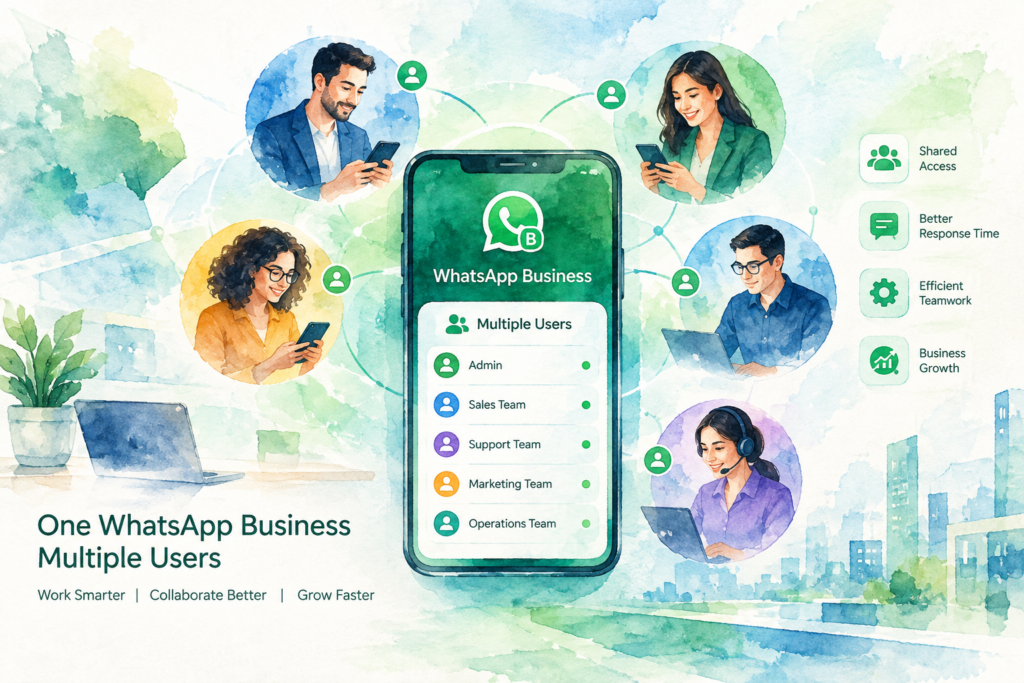
WhatsApp Business multiple users works three ways: linked devices on the free app, a shared team inbox on the WhatsApp Business Platform (API), or one number for every branch with AI routing on top. The free app links up to four extra devices to one number, with no way to assign chats. Businesses with several branches or a sales team need the API and a shared inbox.
Your WhatsApp number started on one phone. Now three staff answer customers, two branches share the line, and nobody knows who replied to whom.
This guide walks through each option for WhatsApp Business multiple users, step by step: what the free app allows, when the API becomes the better choice, and how a business with several branches runs one front door without losing chats.
WhatsApp Business multiple users: the three options
Start with the table, then jump to the WhatsApp Business multiple users option matching your team size.
| Question | Option 1: free app, linked devices | Option 2: API with shared inbox | Option 3: API, inbox and AI routing |
|---|---|---|---|
| People on one number | Main phone plus up to four linked devices | As many seats as your inbox tool sells | As many seats as your inbox tool sells |
| Assign a chat to one person | No | Yes | Yes, automatically by branch or service |
| History kept when staff leave | Only on the shared account | Yes, in the inbox | Yes, in the inbox and the CRM |
| Replies after office hours | Away message only | Away message or manual | AI answers, qualifies and books |
| Monthly cost | Free | Inbox fee plus Meta broadcast fees | Subscription plus Meta broadcast fees |
| Best for | Two to five people, one location | A team on one number | Several branches or sales teams |
Before you set up WhatsApp Business multiple users
Settle four things first. Each one changes which WhatsApp Business multiple users option fits your business.
(1) Count the people. List everyone who answers customers today, including part-timers and the owner on weekends.
(2) Count the numbers. Decide whether customers should see one published number for the whole business or one per branch.
(3) Write the routing rules. Note who handles which questions: sales, bookings, complaints, each branch, each language.
(4) Check your CRM. If leads must land in HubSpot, GoHighLevel or another CRM, the free app will not do the job alone.
Option 1: WhatsApp Business multiple users on the free app
The free WhatsApp Business app links extra devices to one account. WhatsApp's own announcement says you link your phone as one of up to four additional devices, and names this as the way for employees to reply to customers from their own phones under the same business account.
(1) Open WhatsApp Business on the main phone and go to Linked devices.
(2) Tap Link a device and scan the QR code shown on the second phone, tablet or computer.
(3) Repeat for each staff member, up to the device limit. This is the whole WhatsApp Business multiple users setup on the free app.
(4) Set up quick replies and labels so everyone answers the same way and marks chats as new, pending or done.
(5) Keep the main phone active. WhatsApp logs out every linked device when the primary phone sits inactive for a long period.
WhatsApp's help pages cover linked devices on the Business app and the newer multi-agent feature. Check both before you buy anything, because Meta updates the app often.
Where Option 1 stops working. Everyone sees every chat, two people reply to the same customer, and nobody owns the follow-up. There is no report on response times and no connection to a CRM. A single-location business with a few staff copes. A business with branches or a sales target usually outgrows the setup within months.
Option 2: the WhatsApp Business Platform with a shared inbox
The WhatsApp Business Platform moves your number into the cloud. A shared inbox tool sits on top, and each staff member logs in with their own seat from a browser or phone.
(1) Choose an inbox provider built on Meta's official WhatsApp platform.
(2) Verify your business with Meta and connect the number through the provider's signup flow.
(3) Create a seat for each staff member and group seats into teams.
(4) Set assignment rules: round-robin across a sales team, or by keyword, branch or language.
(5) Connect the inbox to your CRM so every chat becomes a contact record.
The app-or-API decision deserves its own read. Our guide on the WhatsApp Business app vs API compares limits and costs side by side, so this page keeps to the multi-user question.
Keep the app and the API on one number. Meta's coexistence option lets a business keep the WhatsApp Business app on the same number while software uses the platform. According to Meta's coexistence documentation, approved chat history from the previous 180 days syncs across, while group chats and broadcast lists stop working in the app. Our WhatsApp AI guide explains when coexistence suits a business owner who lives in the phone app.
Option 3: one number for every branch, with AI routing
A shared inbox fixes ownership of WhatsApp Business multiple users chats. Routing still depends on a person reading each chat first. For a clinic group, a property developer or a retail chain, the first reply and the routing are where enquiries go missing.
Option 3 adds an AI agent in front of the inbox. Here is how the flow runs for a business with several branches.
(1) The customer messages your one published number, from an ad, your website or Google Maps.
(2) The AI replies within seconds in English, Bahasa Malaysia, Mandarin or Cantonese, and answers common questions on prices, hours and locations.
(3) The AI asks for the branch, service or project in the first two messages.
(4) The chat goes to the right team, with the history and the answers attached, and the AI books the slot when the request is a booking.
(5) The CRM gets the record, with the source, branch and status, so managers see the whole pipeline in one place.
Branches wanting their own numbers keep them. All numbers feed one shared inbox, and the same routing rules apply to each. We rebuilt our healthcare AI chatbot and property AI chatbot pages around this multi-branch setup, with examples from each industry.
One number or one number per branch?
Both work for WhatsApp Business multiple users. The right choice depends on how customers find you and how your reporting runs.
| Factor | One number for the business | One number per branch |
|---|---|---|
| Customer experience | One number to remember, on every ad and listing | Local number on each Google Maps listing |
| Routing | AI or staff assign by branch | Arrives pre-sorted by branch |
| Reporting | Branch tag on each chat | Per-number reports, merged in the inbox |
| Staff changes | No effect on customers | No effect on customers, history stays |
A common setup for businesses with several branches: one published number for ads, one number per branch for Google Maps listings, and all of them inside one inbox.
What WhatsApp Business multiple users cost
The free app costs nothing. On the platform, three meters make up your WhatsApp Business multiple users bill.
Meta's broadcast fee. Meta charges a fee for each broadcast message sent through the platform. Your quote from us includes this fee, so you see the full monthly cost before launch.
The inbox or platform fee. Inbox tools charge per seat or per plan. Compare a few before you commit. Our reviews of a SleekFlow alternative and a Wati alternative list published prices, and our Respond.io setup service covers the Respond.io route.
The AI and routing layer. Our managed WhatsApp AI subscription starts from RM 200 a month with no setup fee, and higher tiers up to RM 2,500 a month add branches, languages and CRM connections. Custom integrations are quoted on scope.
Troubleshooting WhatsApp Business multiple users
Chats vanish when a staff member leaves. On the free app, history lives on the shared account and on each device. On the platform, history stays in the inbox. Remove the departing person's seat, and every conversation stays with the business.
Two people reply to the same customer. Turn on assignment in your inbox, so a chat belongs to one person until closed. On the free app, agree a label rule: whoever adds the label owns the chat.
Nobody answers after 6pm. An away message tells the customer to wait. An AI agent answers the question, takes the details and books the slot. Choose based on how many evening enquiries you lose today.
Leads never reach the CRM. Connect the inbox to HubSpot, GoHighLevel or your own system. Our WhatsApp CRM integration guide shows the data flow.
Customers still message old staff numbers. Set an auto-reply on each old number pointing to the main business line, and add the main number to every receipt, invoice and Google Maps listing. Within a few months, most regulars switch over to your WhatsApp Business multiple users inbox on their own.
Replies sound different from person to person. Save approved answers as quick replies or in the AI knowledge base, and review a sample of chats every week.
Linked devices keep logging out. Check the main phone. When the primary phone stays inactive too long, WhatsApp signs out every linked device.
When to stay on the free app. If two or three people answer fewer than 30 chats a day from one location, linked devices and labels are enough. Move to the platform when you add a branch, a sales target or a CRM.
A 30-day plan for WhatsApp Business multiple users
Moving a busy team from one shared phone to a proper inbox goes smoother in stages. This is the plan we follow for a mid-tier WhatsApp Business multiple users rollout.
(1) Week 1: audit. Export a month of chats, count enquiries per day and per branch, and list the 20 questions customers ask most. Note the hours when replies slow down.
(2) Week 2: set up. Verify the business with Meta, connect the number to the platform, create a seat for each staff member and write the routing rules by branch, service and language.
(3) Week 3: test. Staff send the messages real customers send, including rojak and voice notes. Fix wrong answers, wrong routes and missing handovers before any customer sees them.
(4) Week 4: launch and review. Go live on one branch or one channel first. Read the first week of conversations together, then roll out to every branch once the numbers hold.
Keep the old phone switched on during the first two weeks of launch. Customers who saved a personal staff number will keep messaging there, and someone needs to redirect them to the main line.
Mistakes to avoid with WhatsApp Business multiple users
Sharing one login on one phone. A phone passed around the front desk hides who replied to whom. Give each person their own device or seat, even on the free app.
Publishing staff numbers. When a salesperson's personal number sits on the website or on flyers, the leads leave with them. Publish the business number only.
Skipping the routing rules. A shared inbox without rules turns into the same crowded chat list, only on a bigger screen. Write who owns what before launch, not after the first complaint.
Buying seats before fixing answers. More people answering the same 20 questions by hand costs more each month. Automate the common answers first, then size the team for the conversations left over.
Ignoring Meta's template rules. Messages outside the 24-hour window need approved templates. Prepare reminder and follow-up templates early, because approval takes time.
Customer data and PDPA
Every WhatsApp conversation holds personal data, so Malaysia's Personal Data Protection Act applies. The Personal Data Protection Department regulates the Act. Give each person their own login instead of sharing one phone, so you see who read and replied to each chat, and remove access on the day someone leaves.
Device limits and coexistence rules on this WhatsApp Business multiple users guide come from WhatsApp's own announcements and Meta's developer documentation, read in October 2026. Meta updates the app and platform often, so confirm current limits on those pages before you decide. Our own price is the one we publish: from RM 200 to RM 2,500 a month, with custom builds quoted on scope.
The Crunch has set up WhatsApp for Malaysian, Singapore and Hong Kong businesses across healthcare, retail, property and education since 2019, in English, Bahasa Malaysia, Mandarin and Cantonese. A mid-tier setup with a shared inbox, AI replies and a CRM connection goes live in 30 days.
WhatsApp Business multiple users FAQ
01How many people use one WhatsApp Business number?+
On the free app, the main phone plus up to four linked devices, according to WhatsApp.
On the WhatsApp Business Platform with a shared inbox, the limit is the number of seats your inbox provider sells.
02Do I need the WhatsApp API for multiple users?+
Not for a small team at one location. Linked devices on the free app cover two to five people.
You need the platform once you want chat assignment, reports, a CRM connection or several branches on one inbox.
03Does each branch keep its own number in one inbox?+
Yes. Several numbers connect to one shared inbox on the WhatsApp Business Platform.
Each chat carries its branch tag, and managers see every branch in one view.
04Do we keep chat history when staff leave?+
On the platform, yes. History stays in the inbox, and you remove the person's seat.
On the free app, history sits on the shared account, so unlink the departing person's device the same day.
05Do I keep the WhatsApp Business app after moving to the API?+
Yes, through Meta's coexistence option on the same number.
Approved history from the previous 180 days syncs, while group chats and broadcast lists stop working in the app.
06Does the AI reply in Bahasa Malaysia and Chinese?+
Yes. Our setups answer in English, Bahasa Malaysia, Mandarin and Cantonese, including mixed-language messages.
When a person needs to take over, the chat goes to a staff member who speaks the customer's language.
07Does a shared inbox work with HubSpot or GoHighLevel?+
Yes. We connect HubSpot and GoHighLevel as standard, so each chat becomes a contact with its source and branch.
For other CRMs, we check the API during discovery and quote the connection on scope.
08Does Meta charge for WhatsApp messages?+
Yes. Meta charges a fee for each broadcast message.
Our quote includes this fee, so you see the full monthly cost before launch.
Running WhatsApp across several branches or a sales team? Tell us your numbers, branches and monthly chat volume, and we will map the right setup in one call. Book a call with The Crunch.