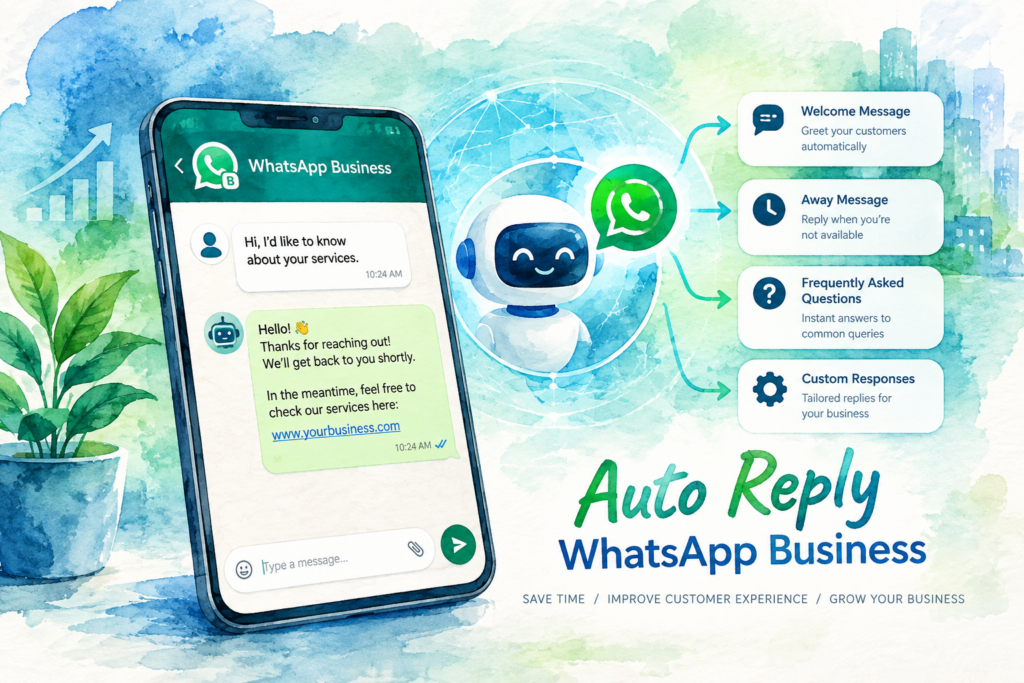
To set up auto reply WhatsApp Business messages, open the Tools tab in the WhatsApp Business app, tap Greeting message or Away message, turn the switch on, edit the text, choose the recipients and tap Save. Greeting messages go to first-time customers and to anyone who returns after two weeks of silence. Away messages follow a schedule you pick. Once customers start asking real questions about prices, slots and stock, a fixed auto reply WhatsApp Business setup stops helping, and an AI agent on the official WhatsApp Business Platform takes over.
A customer messages your business at 11pm asking whether you have a slot on Saturday. Nobody answers until 10am. By then, the customer booked with the shop down the road.
This guide shows how to set up auto reply WhatsApp Business messages in the free app, using the menu names on WhatsApp's help pages as of 19 October 2026. You also get 25 sample messages, a troubleshooting list, and the point where AI replies take over.
What an auto reply WhatsApp Business setup includes
The WhatsApp Business app has four tools for automatic or faster replies. Two send on their own. Two save your staff typing time.
| Tool | What the tool does | When the message goes out | Limit on WhatsApp's help page |
|---|---|---|---|
| Greeting message | Welcomes a customer automatically | First message, or a message after two weeks of inactivity | None listed |
| Away message | Tells customers you are busy or closed | Always, on a custom schedule, or outside business hours | None listed |
| Quick replies | Saved messages sent with a shortcut | When a staff member picks one | Up to 50 stored quick replies |
| Labels or lists | Sorts chats and contacts | Applied by staff | Up to 20 labels or 20 lists |
WhatsApp describes the full feature set on its Business app features page. The steps below follow the Android help articles.
Before you start
Three things need to be in place before any auto reply WhatsApp Business message works.
(1) The WhatsApp Business app, not the personal app. Download WhatsApp Business from Google Play or the App Store. Per About WhatsApp Business, one number runs on one app at a time.
(2) A complete business profile. Add your address, website and business hours. The away schedule option Outside of business hours needs those hours.
(3) A phone with an active internet connection. WhatsApp states greeting and away messages need the device online to send.
Step 1: the auto reply WhatsApp Business greeting message
The greeting message is the first thing a new customer sees from you. Follow the steps from WhatsApp's help article on how to use greeting messages.
(1) From the Tools tab, tap Greeting message.
(2) Turn on Send greeting message.
(3) Tap Greeting message to edit the text, then tap OK.
(4) Tap Recipients and choose Everyone, Everyone not in address book, Everyone except…, or Only send to….
(5) Tap Save.
What the screen shows. A switch labelled Send greeting message sits at the top, then a preview of your text, then a Recipients row. Nothing goes live until you tap Save.
Which recipient setting to pick. Most businesses choose Everyone not in address book, so saved regulars skip the auto reply WhatsApp Business greeting and new leads get one.
Remember the two-week rule. A customer who messaged you within the last two weeks receives no greeting.
Step 2: the away message and schedule
The away message is the auto reply WhatsApp Business customers see when you are closed. WhatsApp's article on how to use away messages lists these steps.
(1) From the Tools tab, tap Away message.
(2) Turn on Send away message.
(3) Under Away message, tap the message to edit the text, then tap OK.
(4) Tap Schedule and choose Always send, Custom schedule, or Outside of business hours.
(5) Tap Recipients and choose Everyone, Everyone not in address book, Everyone except…, or Only send to….
(6) Tap Save.
What the screen shows. The Away message screen matches the greeting screen, with one extra row: Schedule. Outside of business hours stays unavailable until your profile lists business hours.
Which schedule to pick. Outside of business hours suits most shops and clinics. Custom schedule fits a public holiday or a renovation week.
Step 3: create quick replies
Quick replies are saved messages your staff send with a shortcut. They sit alongside your auto reply WhatsApp Business messages and cut typing on the questions you answer 30 times a day. The steps come from WhatsApp's article on how to use quick replies.
(1) From the Tools tab, tap Quick replies.
(2) Tap the add button.
(3) Tap Message to write the reply. Images and videos are allowed on the phone app.
(4) Tap Shortcut to set the keyboard shortcut, for example /fees or /location.
(5) Tap Save.
How staff use them. In any chat, tap Message and type "/". Your quick replies appear, plus default replies built from your profile, such as hours and address.
WhatsApp sets three limits. You store up to 50 quick replies. Media in quick replies does not work on WhatsApp Web or Desktop. A deleted quick reply is gone for good, so keep a copy outside WhatsApp.
Step 4: sort chats with labels or lists
Labels turn a chat list into a queue: New lead, Booked, Paid. WhatsApp is rolling out lists to replace labels gradually, so your phone shows one or the other.
If your app shows labels, WhatsApp's article on how to use labels gives these steps:
(1) To create a label, tap Chats, open the more options menu, and tap Label chat. Enter the label name and tap Save.
(2) To apply a label, tap and hold the chat, tap the label icon, select the labels and tap Save.
If your app shows lists, follow WhatsApp's article on how to use lists:
(1) Tap Tools, then Lists, then New list. Enter a name or use a suggestion, pick a colour, and add people or groups.
(2) To add a contact later, tap and hold the chat, tap the list icon, select the lists and tap Done.
Both features cap at 20. Labels also feed broadcasts: a broadcast sent to a label reaches individual customers only, never groups. Our guide on how to broadcast a WhatsApp message covers the sending side.
Which tool comes first? The away message, because unanswered messages after hours lose more customers than a missing greeting. Add the greeting second, then quick replies for your top five questions.
25 auto reply WhatsApp Business message samples
Each auto reply WhatsApp Business sample below is ready to edit. Replace the text in square brackets and keep each message under four lines.
Clinic auto reply WhatsApp Business samples
| Type | Sample message |
|---|---|
| Greeting | Hi, thanks for messaging [Clinic name]. Reply 1 to book, 2 for clinic hours, 3 for our location. A staff member replies during opening hours. |
| Away | Thanks for your message. The clinic is closed now and opens at [9am]. For an emergency, please call 999 or go to the nearest hospital. |
| Quick reply /fees | A general consultation starts from RM [amount]. Final fees depend on the doctor's assessment. Would you like a slot this week? |
| Quick reply /remind | Hi [Name], a reminder of your appointment on [date] at [time]. Reply YES to confirm or RESCHEDULE to pick a new time. |
Property auto reply WhatsApp Business samples
| Type | Sample message |
|---|---|
| Greeting | Hi, thanks for your interest in [Project name]. Tell us the unit type and your budget, and our agent sends the floor plans. |
| Away | Thanks for messaging. Our sales gallery is closed for the day. We reply from [10am] tomorrow. Floor plans and the price list are at [link]. |
| Quick reply /viewing | Viewings run on [Saturday and Sunday, 10am to 5pm]. Send your preferred day and time, and we confirm by message. |
| Quick reply /loan | Our agent helps with a loan eligibility check. Please share your monthly income range and whether you own other property. |
Retail auto reply WhatsApp Business samples
| Type | Sample message |
|---|---|
| Greeting | Hi, welcome to [Shop name]. Send a photo or the name of the item, and we check stock at your nearest outlet. |
| Away | Thanks for your message. Our team is offline until [10am]. Orders placed on [website] still ship as usual. |
| Quick reply /delivery | Delivery in [Klang Valley] takes [2 to 3] working days. We send the tracking number here once the parcel leaves our store. |
| Quick reply /return | Returns are accepted within [7] days with the receipt. Bring the item to any outlet or reply RETURN for a courier pickup. |
Education auto reply WhatsApp Business samples
| Type | Sample message |
|---|---|
| Greeting | Hi, thanks for contacting [Centre name]. Tell us your child's age and the subject, and we suggest the right class. |
| Away | Thanks for messaging. Our admin team replies from [9am] on weekdays. Class schedules for this term are at [link]. |
| Quick reply /trial | We run a free trial class every [Saturday at 10am]. Reply with your child's name and age to save a seat. |
| Quick reply /fees | Monthly fees for [subject] start from RM [amount] for [four] lessons. Registration and materials are listed at [link]. |
F&B auto reply WhatsApp Business samples
| Type | Sample message |
|---|---|
| Greeting | Hi, thanks for messaging [Restaurant name]. Reply 1 for the menu, 2 to reserve a table, 3 for catering. |
| Away | Thanks for your message. The kitchen is closed now and opens at [11am] daily. For a reservation, send the date, time and number of guests. |
| Quick reply /location | We are at [address], a [3]-minute walk from [station]. Parking is at [location]. |
| Quick reply /catering | Catering starts from [30] pax. Please send the date, venue and headcount, and we reply with a quote within one working day. |
Five samples in Bahasa Malaysia
Many Malaysian customers reply faster in Bahasa Malaysia.
| Industry | Sample message |
|---|---|
| Clinic greeting | Terima kasih kerana menghubungi [Nama klinik]. Balas 1 untuk temu janji, 2 untuk waktu operasi, 3 untuk lokasi klinik. |
| Property greeting | Terima kasih atas minat anda terhadap [Nama projek]. Sila nyatakan jenis unit dan bajet anda, dan ejen kami akan menghantar pelan lantai. |
| Retail away | Terima kasih atas mesej anda. Pasukan kami berada di luar talian sehingga [10 pagi]. Pesanan di [laman web] tetap dihantar seperti biasa. |
| Education greeting | Terima kasih kerana menghubungi [Nama pusat]. Sila beritahu umur anak anda dan subjek pilihan, dan kami akan cadangkan kelas yang sesuai. |
| F&B away | Terima kasih atas mesej anda. Dapur kami dibuka pukul [11 pagi] setiap hari. Untuk tempahan meja, sila hantar tarikh, masa dan bilangan tetamu. |
Want a customer to reach the right chat in one tap? Pair your greeting with a prefilled chat link from our WhatsApp link and QR generator, and print the QR code at the counter.
Troubleshooting: why auto reply WhatsApp Business messages fail
Most failed auto reply WhatsApp Business messages trace back to one of six causes. Work through them in order.
(1) Meta Business Agent is connected. WhatsApp's greeting article states greeting messages switch off automatically when Meta Business Agent is connected. To use greeting messages again, WhatsApp says you need to delete Meta Business Agent.
(2) The recipient setting excludes the customer. With Only send to… or Everyone except…, some customers never receive the message. With Everyone not in address book, saved contacts skip the message too.
(3) The two-week rule. A customer who messaged you in the last two weeks receives no greeting. Test with a number which has never chatted with your business.
(4) The schedule is off. An away message set to Outside of business hours sends nothing during the hours on your profile. Check the hours match your real opening times, including weekends.
(5) The phone is offline. A dead battery or flight mode stops every auto reply WhatsApp Business message.
(6) A stuck setting. WhatsApp suggests toggling the feature off and on, updating the app and restarting the phone.
Where the free auto reply WhatsApp Business app stops
The free app suits one or two people replying by hand. Past this point, four gaps show up.
One message for everyone. The greeting and away messages are fixed text. A customer asking "Is Dr Lim free on Saturday at 3pm?" gets the same reply as a customer asking for parking.
No answers, only acknowledgements. An away message says "we reply at 9am". The customer still waits, and many book elsewhere overnight.
No chat assignment. Staff share one number with no way to assign a chat. Our guide to WhatsApp Business for multiple users covers the options.
No link to your calendar or CRM. A booking made in chat still needs a staff member to type into the calendar, and nothing reaches HubSpot or GoHighLevel.
Our WhatsApp Business app vs API comparison lists every limit side by side.
When a fixed auto reply WhatsApp Business message stops working
Three situations show the limit.
(1) Customers ask real questions. Prices, stock, doctor schedules, unit availability. A fixed message replies with a menu. The customer wanted an answer.
(2) Several staff share the chats. Two people answer the same customer, or nobody does, because the phone app has no assignment or routing.
(3) Bookings arrive after hours. Messages sent after 8pm wait for the morning as the away message repeats your opening hours.
At this stage, the fix is an AI auto reply WhatsApp Business customers get real answers from. The AI reads the question, checks your price list, calendar or stock, and replies with the real answer in seconds.
How AI replies work on the WhatsApp Business Platform
AI replies run on the WhatsApp Business Platform, Meta's official route for connecting software to WhatsApp, often called the API. The free app has no place to plug in an AI.
| Question | Fixed auto reply (free app) | AI reply (Business Platform) |
|---|---|---|
| What the customer gets | The same text every time | An answer to the question asked |
| After-hours bookings | "We reply at 9am" | A slot booked into your calendar |
| Languages | One language, fixed | English, Bahasa Malaysia, Mandarin and Cantonese, matched to the customer |
| Staff on one number | Shared phone, no routing | A shared inbox with routing |
| CRM | None | Every chat and booking logged |
| Hand-off to a person | Staff read every chat | The AI passes complex chats to staff with the full history |
| Cost | Free | Monthly service fee, plus Meta's fee for each broadcast message |
A number moved onto the platform no longer works in the Business app, so plan the switch. Messages on the platform follow the WhatsApp Business Messaging Policy, which requires opt-in before you message customers first.
Our WhatsApp AI guide explains how the AI learns your prices and rules. Our WhatsApp chatbot Malaysia page shows the setups we run. Missed phone calls follow the same pattern, covered in our missed call automation guide.
What moving past a fixed auto reply WhatsApp Business setup costs
The free app costs nothing. AI replies on the platform carry two bills.
The service fee. Our managed WhatsApp AI subscription starts from RM 200 a month, with no setup fee on the entry plan. Plans with more branches, languages and CRM connections cost more.
Meta's fee. Meta charges a fee for each broadcast message. Your quote from us includes this fee, so you see the full monthly cost before launch.
Planning a promotion to past customers as well? Our WhatsApp blast Malaysia guide covers safe sending on the official platform.
Chats hold personal data, so Malaysia's Personal Data Protection Act applies, regulated by the Personal Data Protection Department. Remove former staff from linked devices.
Every menu name, recipient option, schedule option and limit in this auto reply WhatsApp Business guide comes from WhatsApp's Help Center articles on greeting messages, away messages, quick replies, labels and lists, read on 19 October 2026 for Android. WhatsApp updates the app often, so menu names on your phone sometimes differ. Our own price starts from RM 200 a month.
The Crunch has run auto reply WhatsApp Business and AI setups for Malaysian, Singapore and Hong Kong businesses across healthcare, retail, property and education since 2019, in English, Bahasa Malaysia, Mandarin and Cantonese, with a 30-day timeline for mid-tier scope.
Auto reply WhatsApp Business FAQ
01How do I set an auto reply in WhatsApp Business?+
Open the Tools tab, tap Greeting message or Away message, turn on the switch, edit the text, choose the recipients and tap Save.
For away messages, also tap Schedule and pick a timing option.
02Is auto reply available in the normal WhatsApp app?+
No. Greeting messages, away messages, quick replies and labels belong to the free WhatsApp Business app.
One number runs on one app at a time, but you are allowed to move the number between them.
03Why is my WhatsApp Business greeting message not sending?+
Check four things: Meta Business Agent is not connected, the recipient setting includes the customer, the customer has not messaged you in the last two weeks, and the phone is online.
Then update the app and toggle the feature off and on.
04How do I schedule an away message for after hours?+
Add business hours to your business profile first.
Then go to Tools, Away message, Schedule, and choose Outside of business hours. Use Custom schedule for public holidays.
05How many quick replies does WhatsApp Business allow?+
WhatsApp allows up to 50 stored quick replies.
Type "/" in a chat to see them, including default replies built from your business profile.
06Does an auto reply work when my phone is off?+
No. WhatsApp states the device needs an active internet connection to send greeting and away messages.
AI replies on the WhatsApp Business Platform run on servers, so they keep answering when every staff phone is off.
07Does WhatsApp Business answer customer questions automatically?+
The free app sends fixed greeting and away text only.
To answer real questions about prices, stock or slots, you need an AI agent connected through the WhatsApp Business Platform.
08How much does an AI auto reply for WhatsApp cost in Malaysia?+
Our managed WhatsApp AI starts from RM 200 a month with no setup fee.
Meta charges a fee for each broadcast message, and your quote includes this fee.
Customers asking questions your away message cannot answer? Tell us your busiest hours, your branches and the questions customers ask most, and we will show you how an AI reply handles them on one call. Book a call.